KidOK vs TvTantrum: Complete Comparison for Overstimulation-Conscious Parents
Compare KidOK and TvTantrum: Features, pricing, overstimulation ratings, and which app best helps prevent screen time tantrums.

Introduction
Your child watches 20 minutes of a colorful cartoon and suddenly they are hyperactive, cannot focus, and will not calm down. You suspect overstimulation. Now you are trying to decide: KidOK or TvTantrum?
Both apps focus on overstimulation, which is something most parental control tools still treat as a side note. But they solve the problem in different ways. One is more specialized in TV-show analysis. The other is broader across the full media stack most kids use today. That difference matters when you are trying to prevent meltdowns, protect sleep, and make better screen-time choices quickly.
If your child is sensitive to stimulation intensity, choosing the right tool can reduce post-screen tantrums and help the whole day feel calmer. In this comparison, we will break down KidOK and TvTantrum side by side: features, pricing, content coverage, overstimulation methodology, and real-world fit. By the end, you should know exactly which option matches your family.
Transparency note: we created KidOK, and we are still committed to an honest comparison. If TvTantrum is the better fit for your use case, we will say it directly. If you are new to KidOK, KidOK helps parents prevent overstimulation by rating shows, movies, YouTube, and games before kids watch.
What Is TvTantrum?
TvTantrum is an app built specifically to help parents understand how stimulating TV shows are for children. Its mission is clear: prevent TV tantrums by helping families choose lower-intensity shows before pressing play.
The workflow is simple. You search for a show, view a stimulation rating, and then review why a title may be high stimulation. Explanations usually include factors like fast scene changes, bright color saturation, loud audio design, and pace. This level of explanation is useful for parents who do not just want a score, but want to understand what drives that score.
TvTantrum focuses on TV. That specialization is its strength and its main limitation. Coverage outside shows is limited, so parents looking for movie, YouTube, or game analysis need another tool. In practical terms, TvTantrum works best for families whose children primarily consume traditional TV-series content.
Pricing is usually free for basic ratings, with a premium plan around $3.99/month or $29.99/year for additional detail and filtering. Strengths include focused overstimulation analysis and a clear mission for stimulation-sensitive children. Weaknesses include narrower library scope and fewer all-in-one parental guidance features compared with broader platforms.
What Is KidOK?
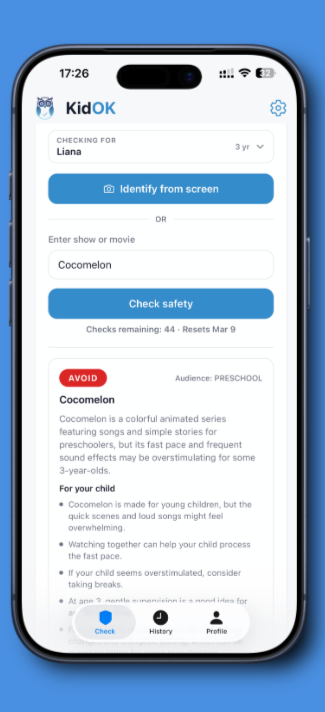
KidOK is a mobile app that rates shows, movies, YouTube channels and videos, and games for safety and overstimulation risk. The mission is to help parents make informed media decisions in seconds instead of digging through long reviews.
The process is straightforward: search for content, open the rating, and review age recommendations, safety notes, and overstimulation risk. This makes KidOK practical when you are in a real parenting moment and need a fast decision, not a deep research session.
KidOK stands out by applying overstimulation analysis across multiple content types, not only TV shows. That means parents can use one app when their child switches between streaming shows, YouTube creators, mobile games, and movies. For many families, that cross-platform coverage is essential because kids rarely stay inside one content lane anymore.
KidOK includes a free tier for basic ratings and a premium plan around $4.99/month or $39.99/year for more advanced filtering and deeper context. Strengths include breadth, speed, mobile-first design, and YouTube coverage. Weaknesses include being a newer brand and offering slightly less TV-only specialization depth than TvTantrum in some cases.
Overstimulation Approach: Depth vs Breadth
This is the core of the kidok vs tvtantrum decision. Both apps care about overstimulation, but they optimize for different outcomes.
TvTantrum's Approach
TvTantrum specializes in TV show overstimulation analysis. It typically scores shows based on cut frequency, color intensity, sound pressure, pacing, and visual complexity. The strongest advantage is explanatory depth for TV content. Parents often get a clear reason why a show lands as low, medium, or high stimulation.
- Specialization: TV-show overstimulation only
- Core factors: cuts, colors, sound, pace, visual load
- Rating output: low, medium, high stimulation
- Main strength: very detailed show-level rationale
- Main limit: no broad multi-platform coverage
KidOK's Approach
KidOK applies a similar overstimulation model across shows, movies, YouTube, and games. The baseline factors are similar, with additional checks for interactive intensity in games. The strength is consistent logic across content categories, which makes decision-making simpler for households that use multiple platforms.
- Breadth: TV, movies, YouTube, games
- Core factors: cuts, colors, sound, pace, visual load
- Game-specific factor: interactive stimulation intensity
- Rating output: low, medium, high overstimulation risk
- Main strength: one framework for all media types
- Main limit: less TV-only specialization than TvTantrum
| Aspect | TvTantrum | KidOK | Winner |
|---|---|---|---|
| Overstimulation depth | Very detailed | Detailed | TvTantrum |
| TV show analysis | Excellent | Good | TvTantrum |
| Movie analysis | No | Yes | KidOK |
| YouTube analysis | No | Yes | KidOK |
| Game analysis | No | Yes | KidOK |
| Specialization | High | Medium | TvTantrum |
| Breadth | Low | High | KidOK |
Real-world example 1: You want to check whether Cocomelon is overstimulating. TvTantrum usually provides a deeper TV-specific read and is excellent for that narrow question. KidOK gives a strong answer too, then helps you continue with movie or YouTube choices in the same app. Winner for this exact scenario: TvTantrum.
Real-world example 2: You need to evaluate a YouTube creator your child watches every day. TvTantrum cannot help because it does not cover that category. KidOK can rate it. Winner for this scenario: KidOK.
If you want broader context before choosing either app, Learn more about overstimulation and how to recognize it. For deeper TV-only screening tactics, Detailed guide to TV show overstimulation.

Coverage and Content Library
Coverage is where the gap becomes obvious. TvTantrum is intentionally narrow: mostly TV shows. KidOK is intentionally broad: TV, movies, YouTube, and games.
TvTantrum coverage is often described as 1,000+ TV shows and growing. That can be enough for TV-only households. But if your child watches YouTube shorts, streams movies, or plays games, you will hit limits fast. In that case, many parents start looking for tvtantrum alternatives that include multi-platform analysis.
KidOK coverage currently spans roughly 5,000+ TV shows, 5,000+ movies, 10,000+ YouTube channels, and 3,000+ games. The exact totals change as libraries grow, but the directional advantage is breadth. This matters in real life because family media behavior changes quickly over time.
| Content Type | TvTantrum | KidOK | Notes |
|---|---|---|---|
| Popular TV shows | Good | Good | Similar for mainstream titles |
| Niche TV shows | Limited | Better | KidOK tends to have broader catalog depth |
| Movies | No | Yes | KidOK only |
| YouTube channels | No | Yes | KidOK only |
| YouTube videos | No | Yes | KidOK only |
| Games | No | Yes | KidOK only |
Practical rule: if your child only watches TV shows, TvTantrum can be enough. If your child moves across TV, movies, YouTube, and games, KidOK is usually the better long-term fit. Honest gap note: KidOK is broad but still growing compared with giant legacy media databases.
A useful way to validate coverage is to audit your child's last 30 days of screen use. Make a short list of the top 15 titles or creators they actually consumed. Then test both apps against that list. If most of your list is TV episodes from a few familiar series, TvTantrum can meet your needs with less spend. If your list includes streaming films, YouTube channels, and game titles, KidOK will usually reduce friction because you do not need separate tools for each media type. This simple audit often resolves the comparison faster than feature marketing pages.
Feature Comparison
Coverage answers what each app can rate. Features answer how useful each app is once you are inside it.
| Feature | TvTantrum | KidOK | Winner |
|---|---|---|---|
| Overstimulation rating | Detailed | Detailed | Tie |
| Age recommendations | Limited | Yes | KidOK |
| Content warnings | Limited | Yes | KidOK |
| TV show coverage | Good | Good | Tie |
| Movie coverage | No | Yes | KidOK |
| YouTube coverage | No | Yes | KidOK |
| Game coverage | No | Yes | KidOK |
| Mobile app | Yes | Yes | Tie |
| Search speed | Fast | Fast | Tie |
| Parental controls guidance | Limited | Recommendations | KidOK |
| Free version | Yes | Yes | Tie |
| Premium depth | Limited | Broader | KidOK |
Major Feature Takeaways
Overstimulation detail: TvTantrum has a small edge for TV-only depth. KidOK remains detailed, but its model is built for breadth first.
Content-type flexibility: KidOK wins decisively because one account can handle shows, movies, YouTube, and games. This becomes important when a child changes apps frequently throughout the week.
Guidance quality: KidOK usually provides clearer age recommendations and warning context, which helps parents who need fast yes/no decisions and practical alternatives. TvTantrum is stronger when your primary decision is a TV-show stimulation check only.
If you searched kidok vs tv tantrum to decide based on features alone, the short answer is this: TvTantrum wins specialization, KidOK wins versatility.
Pricing Comparison
Price matters, but value per content type matters more. TvTantrum premium is cheaper. KidOK premium is broader.
TvTantrum Pricing
Free includes basic TV overstimulation ratings. Premium is typically $3.99/month or $29.99/year for deeper analysis, filters, and support. Value is strong if your use case is only TV shows.
KidOK Pricing
Free includes basic ratings across all supported content types. Premium is typically $4.99/month or $39.99/year for advanced filters, deeper overstimulation context, and practical guidance. Value is strongest for families using more than one platform.
| Feature | TvTantrum Free | TvTantrum Premium | KidOK Free | KidOK Premium |
|---|---|---|---|---|
| TV show ratings | Yes | Yes | Yes | Yes |
| Overstimulation ratings | Yes | Yes | Yes | Yes |
| Movie ratings | No | No | Yes | Yes |
| YouTube ratings | No | No | Yes | Yes |
| Game ratings | No | No | Yes | Yes |
| Advanced filters | No | Yes | No | Yes |
| Monthly cost | Free | $3.99 | Free | $4.99 |
| Annual cost | Free | $29.99 | Free | $39.99 |
Bottom line: TvTantrum premium is lower-cost. KidOK premium covers more surfaces. If your child watches only TV, TvTantrum can be better value. If your child watches TV plus movies or YouTube, KidOK usually delivers more practical value per dollar.
The Verdict: Which Should You Choose?
The honest answer is not one universal winner. It depends on media pattern, not marketing claims.
Choose TvTantrum if:
- You only care about TV show overstimulation
- You want the deepest TV-specific stimulation breakdowns
- You want the cheaper premium plan ($29.99/year)
- You do not need movie, YouTube, or game coverage
- You prefer a specialized single-purpose tool
Choose KidOK if:
- Your child uses TV, movies, YouTube, or games
- You want one overstimulation framework across all content
- You need age recommendations and content warnings
- You want practical parental guidance in the same app
- You prefer a one-app media decision workflow
Honest summary: TvTantrum is better for a narrow need, detailed TV overstimulation analysis. KidOK is better for broader family use across platforms. Most families today consume mixed media, which is why KidOK is often the default long-term choice.
| Scenario | Best Choice | Why |
|---|---|---|
| Only watch TV shows | TvTantrum | Specialized and cheaper premium |
| Watch TV and YouTube | KidOK | YouTube coverage |
| Watch TV and movies | KidOK | Movie coverage |
| Play games | KidOK | Game analysis support |
| Want deepest TV analysis | TvTantrum | TV specialization |
| Want one app for everything | KidOK | Comprehensive content coverage |
| Strict budget focus | TvTantrum | Lower annual premium cost |
| Need age recommendations | KidOK | Clearer guidance layers |
Practical recommendation: if your child only watches TV, start with TvTantrum free. If your child consumes content across platforms, start with KidOK free. If budget is tight, test both free tiers for two weeks and keep the app you actually use.
For a cleaner decision, run a 14-day trial with a short scorecard. Track four outcomes: how often you find the content you need, how fast you can make a yes/no choice, whether post-screen behavior improves, and whether bedtime gets easier. Give each app a score from 1 to 5 in each category. The higher total usually points to the right long-term choice for your household. This keeps the decision practical and avoids paying for features you rarely use.
FAQ
Common Questions Parents Ask
Not necessarily. TvTantrum is better for specialized TV show overstimulation analysis. KidOK is better for comprehensive coverage across TV, movies, YouTube, and games. The best choice depends on your family's media habits.
No. TvTantrum focuses on TV shows. If your child regularly watches YouTube channels or videos, you will need KidOK for that coverage.
TvTantrum is slightly more detailed for TV shows because that is its core specialization. KidOK is also detailed but designed to cover multiple content types, not only shows.
Yes. Some parents use TvTantrum for deep TV-show analysis and KidOK for movies, YouTube, and games. In most households, KidOK alone is enough because media use is spread across platforms.
TvTantrum premium is cheaper at $29.99/year compared with KidOK at $39.99/year. However, KidOK includes broader content coverage, which can make it better value for multi-platform families.
Both are useful for overstimulation-aware parenting. TvTantrum is more specialized for TV shows, while KidOK is more comprehensive across all major content categories.
KidOK has strong TV-show overstimulation analysis, but TvTantrum is a bit deeper for TV-only scenarios. KidOK adds movies, YouTube, and games so parents can use one app for most decisions.
TvTantrum may be enough if your child truly only watches TV shows. KidOK free is still worth trying because your media habits may expand to movies, YouTube, or games later.
Start with both free tiers. If you use one daily and want deeper filtering, premium is usually worth it. Choose premium based on where your child spends most screen time.
No. TvTantrum does not currently cover YouTube content. KidOK is the practical option if YouTube overstimulation is part of your concern.
Conclusion
TvTantrum is a focused option for detailed TV-show overstimulation analysis. KidOK is the broader option for families who need one app across shows, movies, YouTube, and games.
The key decision rule is simple: choose based on your child's actual media mix, not on feature lists alone. If your family is TV-only, TvTantrum can work well. If your family spans multiple platforms, KidOK will usually save time and reduce guesswork.
Next steps: download both free versions, use each for a week, and notice which one you open first in real decisions. That is usually the right tool for your workflow. Whatever you choose, intentional media decisions are what protect your child most.
KidOK helps parents prevent overstimulation while keeping screen-time choices practical and realistic for daily life.
Ready to check content before your child watches? Download on theApp StoreGet it onGoogle Play.