Video Game Safety for Kids: ESRB Ratings, Age Guidelines & Parental Controls
Complete guide to video game safety: Learn ESRB ratings, age-appropriate games, online safety tips, and parental controls to keep kids safe while gaming.
Introduction
Your 8-year-old wants to play Fortnite. Your 10-year-old is asking for Call of Duty because friends play it after school. You open the store page, see a rating badge, and still wonder what it actually means. Is the game age-appropriate? Is online play safe? Will it affect sleep, behavior, or school focus?
Video game safety is not just about one label on a box. Parents are asked to evaluate content maturity, chat risk, stranger contact, in-game spending, and screen-time balance at the same time. That is a lot. Many families end up making decisions fast without a clear framework.
In this complete guide, we break down ESRB ratings, explain age guidelines, cover online safety, and show how to set practical parental controls across major platforms. At KidOK, we specialize in child safety and content ratings, and our team includes child development experts and gaming safety specialists. KidOK helps parents understand which games are safe for their childrenbefore play starts.
This is a balanced guide, not an anti-gaming message. Gaming can support creativity, problem-solving, teamwork, and social connection when the game matches the child and the routine has boundaries. The objective is to help you guide choices with confidence so gaming stays a healthy activity instead of a daily source of conflict.
What Is ESRB?
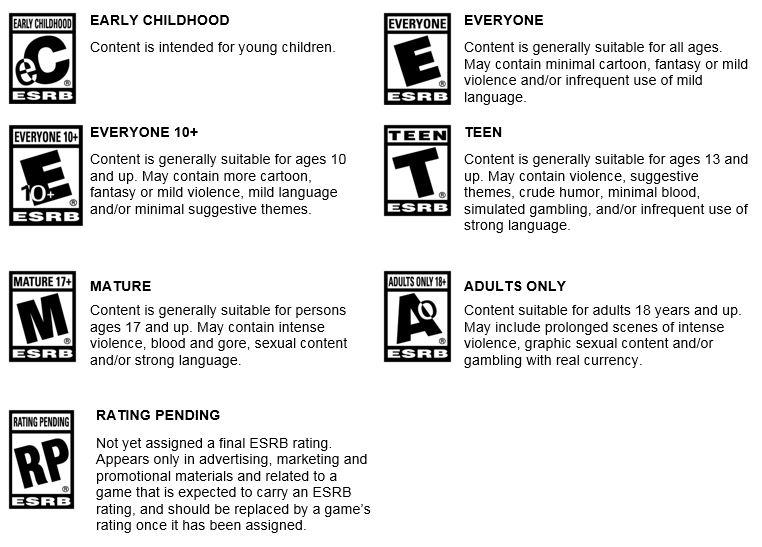
ESRB stands for Entertainment Software Rating Board. It is the primary video game rating system in North America, including the United States and Canada. Think of it like movie ratings, but for games. The goal is to help parents quickly understand age-appropriateness and content type.
ESRB exists because games can include violence, language, sexual themes, gambling mechanics, and online interactions. Parents need a fast, standardized way to evaluate that content before children play. ESRB provides two layers of information: an age category and content descriptors that explain why the game received that category.
The system was created in 1994 by the game industry as a self-regulatory framework and is now used by major publishers and platforms. Ratings are assigned through a structured review process using gameplay footage and detailed content questionnaires reviewed by trained independent raters.
In day-to-day parenting, the most useful part of ESRB is not just the age badge. It is the descriptor line that explains what appears in the game, such as fantasy violence, strong language, or simulated gambling. Two games with the same age category can feel very different in tone and intensity, so descriptors help families choose with more precision. Ratings also cannot fully represent live user behavior in online games, which is why supervision and platform controls remain essential.
If you want to verify a specific title, the official ESRB database is the most reliable source. ESRB official site.
ESRB Rating Categories Explained
EC (Early Childhood) - Ages 3+
- Meaning: Designed for very young children with minimal risk content.
- Typical content: No violence, no scary themes, simple learning play.
- Examples: Early learning apps and preschool educational games.
- Parent note: Safest category for beginner players.
E (Everyone) - Ages 6+
- Meaning: Suitable for broad audiences.
- Typical content: Mild cartoon action, little or no language concerns.
- Examples: Super Mario entries, Kirby titles, many Minecraft modes, platformers and puzzle games.
- Parent note: Generally low risk, but still review descriptors and online features.
E10+ (Everyone 10+) - Ages 10+
- Meaning: Slightly stronger themes than E.
- Typical content: Cartoon violence, mild language, fantasy combat, moderate intensity.
- Examples: Some Roblox experiences, selected action-adventure and shooter-lite titles.
- Parent note: Good fit for many older kids when chat and spending are controlled.
T (Teen) - Ages 13+
- Meaning: Teen-level content and higher intensity.
- Typical content: More realistic violence, stronger language, suggestive themes, and higher arousal pacing.
- Examples: Fortnite and many competitive online shooters are often rated T, though editions and regions can vary.
- Parent note: Requires active parental judgment, especially with online multiplayer.
M (Mature) - Ages 17+
- Meaning: Mature content intended for older teens and adults.
- Typical content: Graphic violence, strong profanity, sexual content, and/or drug references.
- Examples: Most Call of Duty mainline entries, Grand Theft Auto series, Resident Evil, many adult action franchises.
- Parent note: Not recommended for children under 17.
AO (Adults Only) - Ages 18+
- Meaning: Adults-only content with the highest maturity level.
- Typical content: Explicit sexual content or extreme violence themes.
- Examples: Rare in mainstream retail platforms.
- Parent note: Not appropriate for children.
Important: ratings are guidance, not a full parenting decision. Use the label plus content descriptors plus your child's maturity level.
Age-Appropriate Games by Rating
Every child is different, so use these as practical starting points, not rigid rules. We have reviewed thousands of games and see the same pattern: outcome quality depends more on fit, supervision, and limits than on any one title name.
Ages 5 to 7 (EC and E)
- Mario Kart
- Super Mario Bros
- Kirby titles
- Minecraft in Creative Mode
- Pokemon entry-level titles
- Animal Crossing
- Splatoon (with supervision)
Ages 8 to 10 (E and E10+)
- Pokemon newer editions
- Roblox with strict parental settings
- Minecraft Survival Mode
- Zelda: Link's Awakening
- Kirby series
- Splatoon 3
- Mario Party
Ages 11 to 13 (E10+ and T)
- Fortnite with chat and spending controls
- Minecraft all modes with monitored servers
- Roblox with restrictions and known friend lists
- Splatoon 3 and Zelda: Breath of the Wild
- Mario Kart 8
- Call of Duty only with strong parental judgment and monitoring
Ages 14+ (T and selected M)
- Fortnite
- Call of Duty mainline titles
- Minecraft and Roblox ecosystems
- GTA and Resident Evil remain M-rated, not ideal for most minors
Maturity matters more than birthday alone. Some 10-year-olds regulate well with E10+ content, while others do better with calmer E-rated games. Online multiplayer always adds additional safety variables.
Practical rule: test new titles in short sessions first. Watch one session together, then check for post-play behavior changes such as irritability, trouble transitioning, or sleep delay. If behavior is stable and school routines stay intact, the title may be a fit. If not, reduce intensity, shorten sessions, or move to a lower-arousal option.
Online Gaming Safety
Who your child plays with
Online play can connect children to strangers worldwide. Some people may misrepresent age or identity. Teach children to play with known friends, avoid sharing personal information, decline unknown friend requests, and report suspicious behavior.
A useful family rule is closed circles only: your child plays only with classmates, cousins, or approved family friends. If a game does not allow that level of control, restrict multiplayer modes until your child is old enough for safer communication habits.
In-game chat and communication
Voice and text chat can expose children to bullying, explicit language, and threats. Disable voice chat where possible, restrict contact lists, and review chat settings regularly. Teach children to disengage and report, not argue, when harassment appears.
Many parents also use a simple response script children can memorize: leave chat, block user, report account, tell parent. Clear scripts reduce freeze responses and help children act quickly when something feels unsafe.
In-game purchases and spending pressure
Cosmetic stores, passes, and limited-time offers are designed to increase urgency. Children can overspend quickly without clear controls. Require purchase approval, set wallet limits, and use gift card budgets instead of always-on payment methods.
If your child asks for frequent purchases, treat it as a budgeting lesson. Set a monthly amount, explain tradeoffs, and avoid impulse spending during emotional moments. This builds digital money habits and reduces power struggles.
Gaming time and habit formation
Many online games use reward loops that can extend sessions beyond intent. Set clear daily limits, block pre-bed gaming, and schedule breaks every 30 to 60 minutes. Balanced routines protect sleep and school performance. AAP family media guidance is helpful when setting age-appropriate expectations. AAP family media recommendations.
Time limits work best when they are predictable and visible. Set start and end times before play begins, give a five-minute warning, and pair ending with a clear next activity such as snack, homework, or outdoor time. Transition planning is often as important as the limit itself.
Overstimulation from interactive gaming
Games can be more intense than passive video because children are actively responding at high speed. Fast visuals, bright effects, constant alerts, and competition can increase arousal and post-play dysregulation. Learn more about gaming overstimulation and how to recognize it. If you want a direct comparison with TV pacing patterns, Compare gaming overstimulation to show overstimulation.
One parent told us her 12-year-old looked fine during competitive matches but became argumentative and restless for over an hour afterward. Reducing match length and switching to calmer co-op games improved sleep and family transitions within a week. Patterns like this are common and fixable when families track triggers consistently.
Parental Controls Setup Guide
Nintendo Switch
- System Settings to Parental Controls
- Set ESRB age limit restrictions
- Set daily play-time limits
- Restrict communication features
- Require approval for purchases
- Review activity reports weekly
PlayStation
- Settings to Family and Parental Controls
- Create a restricted child account
- Apply age-level game restrictions
- Set time windows and session limits
- Restrict chat and messaging
- Turn on purchase approval requirements
Xbox
- Settings to Account to Family Settings
- Create child profile with restrictions
- Set game age and content filters
- Apply screen-time schedules
- Limit social communication
- Monitor usage through family dashboard
PC and Steam
- Windows Family Safety for app and age controls
- Set account-level time limits and usage reports
- Use Steam Family controls for access restrictions
- Require passwords for purchases and changes
Mobile gaming (iOS and Android)
- iOS: Screen Time, Content and Privacy Restrictions
- Android: Digital Wellbeing and Family controls
- Set app limits, purchase locks, and age filters
Best practice: set controls before access, use strong parent-only passwords, and explain limits in plain language. Controls work best when paired with communication, not as a silent punishment system.
Implementation tip: do a 15-minute monthly settings review. Children age quickly, games update frequently, and default settings can change. A short recurring review keeps restrictions aligned with current maturity and prevents surprises.
Red Flags: Games to Be Careful About
Parents ask about these titles most often. The goal is not fear, it is clarity. Popular games can be workable with limits, while others are best delayed due to clear maturity mismatches.
Fortnite
Why parents worry: shooter mechanics, live online lobbies, and purchases. Reality: stylized visuals and no graphic blood in core modes. Main risks are chat exposure, time overuse, and spending pressure.
Minecraft
Why parents worry: open servers and endless play loops. Reality: highly flexible and often educational. Main risks are unmoderated multiplayer and overstimulation in long sessions.
Roblox
Why parents worry: user-generated content varies widely. Reality: many experiences are child-friendly, but quality and moderation differ by game. Main risks are chat, spending, and inconsistent content.
Call of Duty
Why parents worry: realistic combat and strong language. Reality: popular teen and adult franchise with high-intensity play. Main risks are mature content and open voice channels.
Grand Theft Auto
Why parents worry: mature themes across violence, language, and sexual content. Reality: designed for adults. Parent guidance: not recommended for children under 17.
Use these examples as conversation starters with your child. A simple approach is: what is the rating, what are the top concerns, what controls are required, and what behavior will tell us this game is not a fit.
FAQ
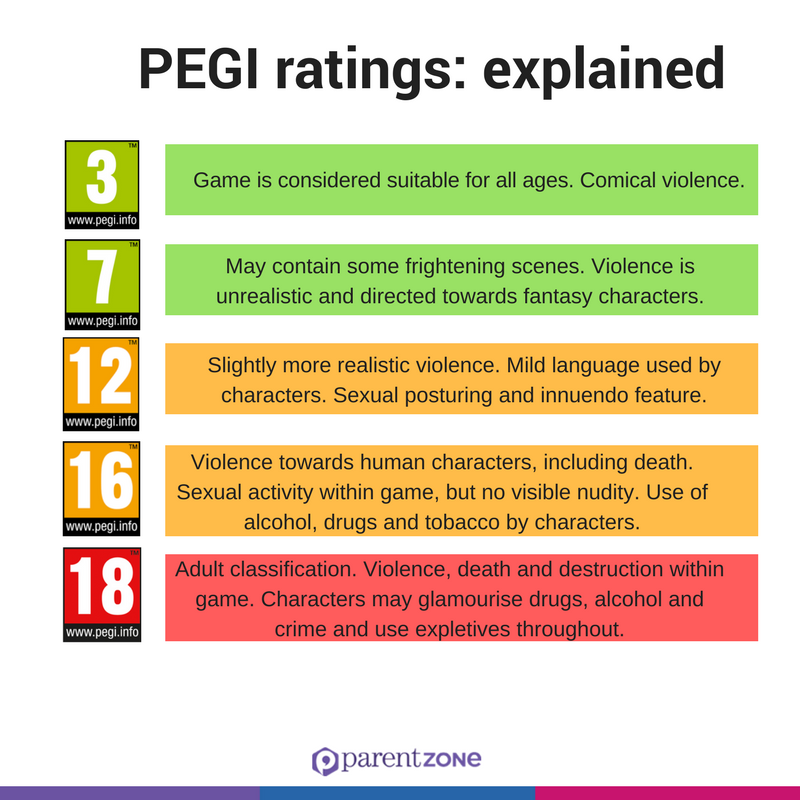
Q: What is the difference between ESRB and PEGI ratings?
ESRB is used in North America, including the United States and Canada. PEGI is used in Europe. They are similar systems but use different age categories. If you are in North America, use ESRB. If you are in Europe, use PEGI.
Q: My child wants to play a T-rated game. Is it okay?
T-rated games are recommended for ages 13 and up. If your child is 13 or older and shows strong maturity, it may be appropriate. Always check the content descriptors because some T-rated games are more intense than others.
Q: Can I trust ESRB ratings?
Yes. ESRB ratings are assigned by trained independent raters, not by game publishers. Ratings are reliable as a starting point, but every child is different, so combine ratings with your own judgment.
Q: How do I know if a game is overstimulating?
Watch behavior during and after play. Warning signs include hyperactivity, irritability, poor focus, and sleep disruption. If symptoms repeat after specific games, reduce time or switch to calmer titles.
Q: Is online gaming safe for kids?
Online gaming has risks such as stranger contact, bullying, inappropriate chat, and overspending. With parental controls, supervision, and clear rules, many children can play online more safely.
Q: How much gaming is too much?
AAP family media guidance supports balanced daily screen use with clear boundaries. For many school-age children, keeping gaming around 1 to 2 hours daily and protecting sleep time is a practical limit.
Q: Should I play games with my child?
Yes. Co-playing is one of the best safety tools. It helps you understand content, model healthy behavior, and start better conversations about ratings, chat, and spending.
Q: How do I talk to my child about game ratings?
Explain that ratings are safety labels, not punishments. Use clear language such as: this game has content for older teens, so we will wait until you are older.
Q: What if my child already plays games rated for older kids?
Do not panic. Talk about what they like, set boundaries, turn on parental controls, and monitor behavior. If regulation or sleep gets worse, adjust quickly.
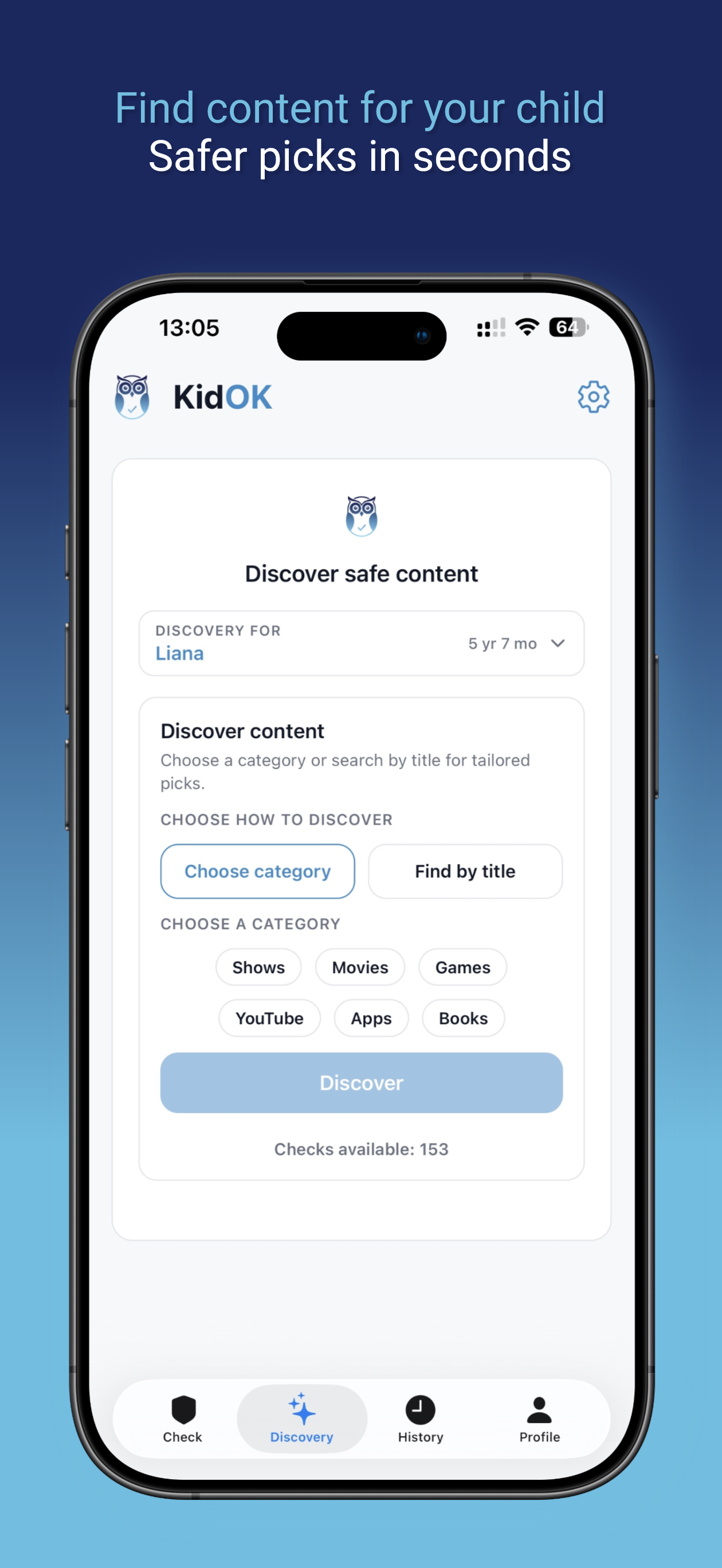
Q: How can KidOK help with game safety?
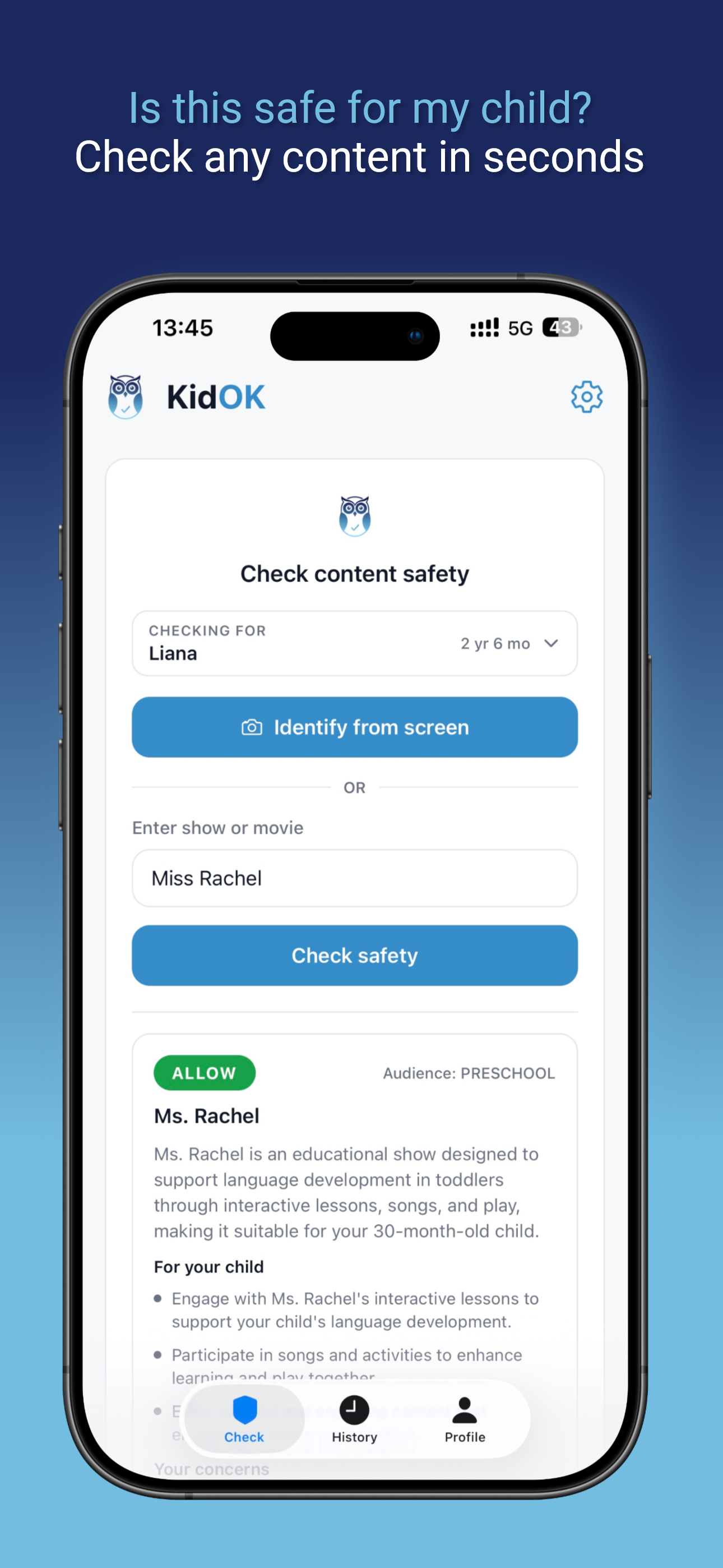
KidOK rates games for safety, overstimulation risk, and age-appropriateness. Before your child plays a new game, you can check KidOK in seconds and make a more informed decision.
How KidOK Helps
You now understand ratings and online risk patterns. The hard part is speed. Parents rarely have time to research every new game request, compare ratings, read long reviews, and evaluate overstimulation risk in the moment.
KidOK solves that decision gap with clear game safety ratings, age-appropriateness guidance, ESRB context, overstimulation signals, spending warnings, online risk notes, and parental-control suggestions in one place. Search any title, review key concerns in seconds, and decide confidently based on your child's maturity and sensitivity profile.
The workflow is simple:
- Search the game your child requested
- Review safety level, ESRB context, and specific risk factors
- Check overstimulation and online safety flags
- Apply recommended controls for the platform you use
- Decide yes, not yet, or yes with conditions
One parent told us her 12-year-old became dysregulated after high-intensity sessions. Using KidOK helped them pick calmer alternatives and set practical limits without daily conflict.
Download KidOK today and check any game before your child plays it. Download on theApp StoreGet it onGoogle Play
Conclusion
ESRB ratings are a strong starting point for safer game decisions. Online gaming adds extra concerns such as stranger contact, chat exposure, spending pressure, and overstimulation. Parental controls and consistent communication are the core tools that keep children safer.
Start with one concrete action this week: set parental controls on your child's primary device, then explain why those limits exist. When children understand protection goals, compliance improves. Gaming is not inherently bad. With clear boundaries and smart tools, it can be social, enjoyable, and even educational.
This guide is based on ESRB ratings and expert opinion. Always use your judgment based on your child's maturity level and specific needs.