Video Game Content Ratings Explained: Find the Right Games for Your Child's Age & Sensitivities
Learn ESRB & PEGI ratings, understand content descriptors, and find age-appropriate games for your child's sensitivities. Complete parent guide.
Video game content ratings can feel confusing, but they do not have to be. Most parents want to make smart choices without becoming experts, and that is exactly what this guide is for. If you have ever wondered what ESRB or PEGI actually mean—or why a game gets different labels in different countries—you are in the right place.
Screens happen. The goal is not to eliminate games, but to make sure the content fits your child’s age and sensitivities. This guide explains the two major video game content rating systems, shows how to read content descriptors, and gives a simple step‑by‑step method to pick games that feel right for your family.
If you are skimming, here is the quick idea: use the rating as a starting point, then focus on the descriptors and your child’s unique sensitivities. That mix is what turns a generic label into a decision that feels personal and practical.
You do not need a perfect answer for every game. You just need a process that keeps you informed and reduces surprises. That is why this article focuses on practical steps instead of technical details.
It is built for real‑life decisions, not perfect conditions.
Why Game Ratings Matter (and Why Parents Ignore Them)
A lot of parents skip ratings. One common survey found that around 90% of parents do not check ratings consistently before buying games. The main reason is not that parents do not care—it is that the systems feel confusing, and the labels do not always match what parents see in real gameplay.
There are also multiple systems (ESRB in the US and PEGI in Europe), and they do not line up perfectly. This guide breaks both down and explains how to actually use them. The result is a clearer, calmer process for choosing age‑appropriate games.
Another reason ratings get ignored is timing. Parents often make decisions in a rush—at the store, during a download, or while a child is excited. Having a simple framework can lower stress and make the choice feel more confident.
This guide covers each video game content rating system in plain language and shows how to use it alongside your own family values.
Think of ratings as a helpful label, not a final decision. The most confident parents use the label, skim a short summary, and then ask, “How will my child respond to this?”
What is ESRB? (Entertainment Software Rating Board)
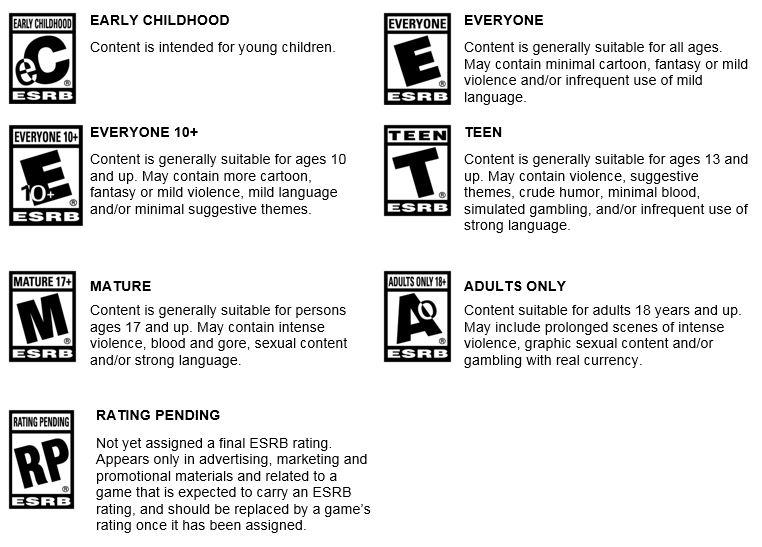
ESRB is the primary video game content rating system in the United States and Canada. It uses age categories plus content descriptors so parents can understand both the suggested age and the type of content inside.
- E (Everyone): Suitable for most ages
- E10+ (Everyone 10+): Mild content not suited for younger children
- T (Teen): Content generally suitable for 13+
- M (Mature): Intended for 17+
- AO (Adults Only): Intended for 18+
ESRB also includes content descriptors that explain what is inside: things like violence, language, sexual content, gambling, and more. These descriptors are often more useful than the age letter alone.
For example, two games can both be rated T, yet one might be labeled for “Mild Violence” and the other for “Strong Language.” If your child is sensitive to one of those areas, the descriptors matter more than the letter on the front.
ESRB also notes if a game includes online interactions. This matters because chat, messaging, and user‑generated content can change what a child sees even if the base game looks mild. The label is not saying online content is unsafe—it is simply a reminder that it can vary.
If your child plays online, this is a good moment to check platform settings too. Ratings describe the game’s content, while console settings can limit chat, purchases, or playtime.
Real example: Minecraft is rated E10+, while Fortnite is rated T. The ratings reflect the overall intensity and content, not just popularity.
If you want to go deeper, the ESRB website also provides rating summaries for many games. These short summaries describe what reviewers saw in gameplay, which can be helpful when the title is unfamiliar.
Another tip: stores and console dashboards usually display ESRB ratings on the product page. You can often tap the rating to see the descriptors without leaving the store.
What is PEGI? (Pan‑European Game Information)
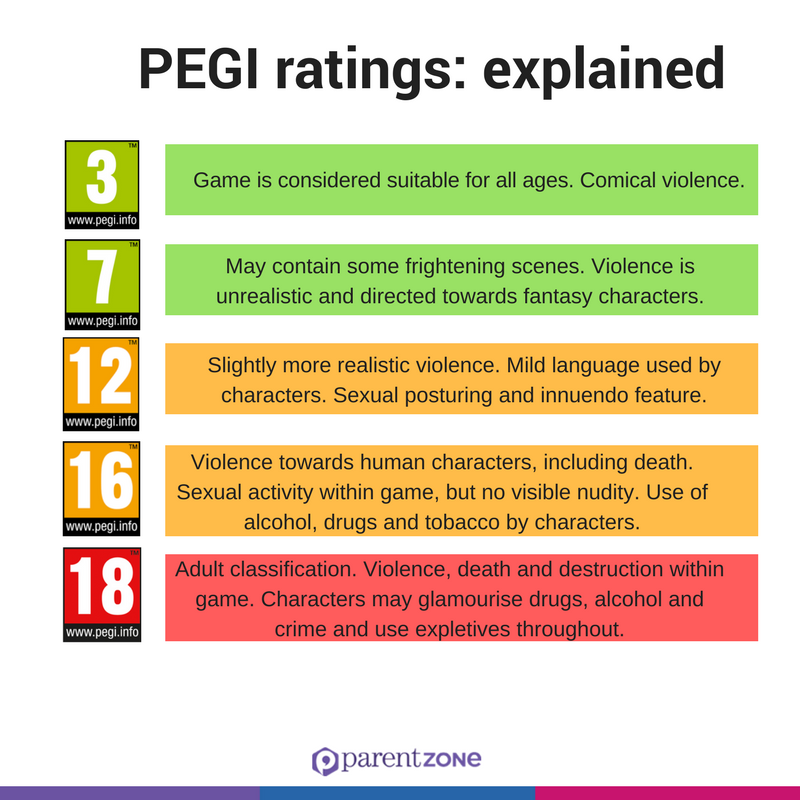
PEGI is the main video game content rating system across Europe and the UK. It uses age numbers instead of letters, and it also includes content icons that describe why a game earned that rating.
- 3: Suitable for all ages
- 7: Mild scary scenes or sounds
- 12: Moderate violence or mild language
- 16: More realistic violence or stronger language
- 18: Intense violence, sexual content, or gambling
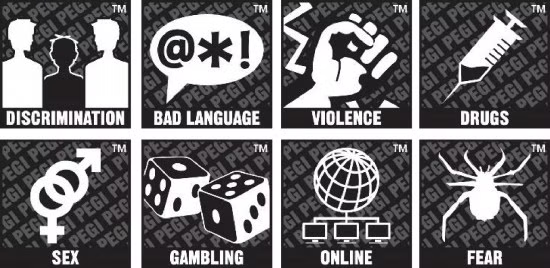
PEGI has separate icon labels for violence, language, fear, gambling, and other content categories. These can be helpful if your child has specific sensitivities.
Ratings can vary by region. A game might be rated T in the US but 12 or 16 in the UK depending on how PEGI evaluates the same content.
This does not mean one system is “right” and the other is “wrong.” It means the same game can be interpreted differently based on regional guidelines. For parents, it is another reminder to read the descriptors and not rely solely on the age number.
PEGI is used widely across Europe, the UK, and often in the Middle East. If your family travels or uses a foreign game store, you may see PEGI labels even if you usually use ESRB. The good news is that both systems describe similar content categories.
PEGI’s icon system is very visual. If you are scanning quickly, the icons can be faster to understand than the age number alone. Look for the symbols for violence, fear, language, gambling, or online interaction.
ESRB vs PEGI: Quick Comparison
| ESRB | PEGI | General Meaning |
|---|---|---|
| E | 3 | Suitable for most ages |
| E10+ | 7 | Mild content, some scary elements |
| T | 12 | Moderate violence or language |
| M | 16 | Stronger violence or mature themes |
| AO | 18 | Adults only content |
Remember, this table is a helpful comparison, not a perfect conversion. If a game is rated T in the US, it will usually land around 12 or 16 in PEGI, but the descriptors are the best place to confirm what the rating actually means.
Understanding Content Descriptors
Content descriptors are the real clue to how a game feels. They cover categories like violence, language, sexual content, gambling, substances, and fear. A game can be rated T for mild language but still be intense for a child who is sensitive to that topic.
Descriptors help you match the game to your child’s sensitivities instead of relying only on age. This is especially important for kids who are sensitive to scary content, aggressive themes, or certain types of dialogue.
Think of descriptors as the “why” behind the rating. If a game is rated 12 or T, the descriptor tells you whether the issue is mild violence, online interactions, crude humor, or something else entirely.
If you are unsure what a descriptor means, you can usually find a brief explanation on the ESRB or PEGI site. For example, “Violence” can range from cartoonish and mild to realistic and intense. The descriptor gives you a starting point, and a quick gameplay preview can fill in the rest.
Descriptors also help explain why a game might feel okay to one family but not another. A family that is fine with mild fantasy combat might still avoid games with gambling mechanics or online chat.
Beyond Age: Matching Games to Your Child's Sensitivities
Age ratings are a starting point, not the full picture. Two 10‑year‑olds can have very different reactions to the same content. One child may be fine with mild fantasy combat while another is upset by it. This is why sensitivities matter as much as age.
Common sensitivity areas include:
- Violence or fighting
- Scary scenes or themes
- Strong language
- Sexual content or innuendo
- Gambling or loot box mechanics
Family preferences matter too. Some parents prioritize educational value or cooperative play. Others want to avoid open chat or social features. These factors are not captured by age ratings alone.
This is where KidOK comes in. It lets you check games using your child’s profile, not just the generic rating system. That means you can see how a game aligns with your child’s sensitivities and your family’s preferences.
Think of it as “personalized ratings.” Two kids of the same age can have very different needs. A personalized check helps you match the content to your child rather than the average child.
If you already use parental controls for video games, ratings still matter. Controls can limit access, but ratings and descriptors explain what the content actually includes.
This is also helpful when a game is popular and your child is asking for it. Instead of saying yes or no quickly, you can check the content and then have a calm conversation about why it fits—or why it does not.
It can also help with shared play. If siblings have different sensitivities, you can choose games that work for both or set a plan for when older kids play.
Social features are another big sensitivity area. Even a mild game can feel overwhelming if it includes open voice chat or competitive lobbies. If that is a concern, look for single‑player or local co‑op options.
Want a faster way to match games to your child? Download on theApp StoreGet it onGoogle Play
How to Choose Age‑Appropriate Games (Step‑by‑Step)
- Check the rating (ESRB or PEGI)
- Read the content descriptors
- Consider your child’s maturity level
- Watch gameplay videos
- Use KidOK to rate games based on your child’s profile
This simple flow reduces guesswork. It lets you move quickly while still making thoughtful choices about what your child will see and hear.
If you are short on time, steps 1, 2, and 5 cover most of what parents need. Ratings plus descriptors plus a personalized check give you a solid snapshot without hours of research.
Watching a few minutes of gameplay is often the clearest signal. Some games read as mild on paper but feel intense in motion. Others look more playful than their rating suggests. A short preview gives you the “feel” that a rating label cannot provide.
If you are shopping with your child, share what you are looking for. A simple line like, “We choose games that match your age and feel calm,” helps kids understand the decision and reduces pushback.
If you want one more shortcut, look for the game’s official trailer and a parent‑written review. That combination usually gives you enough to decide without digging too deep.
Common Parent Mistakes When Using Ratings
- Mistake 1: Assuming the age rating is right for every child that age
- Mistake 2: Ignoring content descriptors
- Mistake 3: Not considering your child’s sensitivities
- Mistake 4: Trusting only one rating system
Ratings are a helpful guide, but the most useful decisions combine rating info with your knowledge of your child.
One more mistake is forgetting about updates. Online games change over time. A game that felt mild a year ago can add new modes, social features, or content. Re‑checking from time to time can prevent surprises.
Another common issue is relying only on friends’ recommendations. A game that works for another child may not fit yours. Your child’s temperament is the best guide.
Also watch for in‑game purchases. Even games rated for younger audiences can include loot boxes or store features. These might not be harmful, but they do influence how a game feels and how often kids ask to keep playing.
FAQ: Game Rating Questions Parents Ask
Maybe. T is a starting point, but content descriptors and your child’s sensitivities matter more than the age label alone. Check the specific themes and gameplay before deciding.
Each region uses its own rating system and cultural standards. A game can be rated T by ESRB in the US and 12 or 16 by PEGI in Europe based on local guidelines.
Check the game box, digital store page, or the official ESRB/PEGI website. Most platforms also display ratings and content descriptors on the product page.
Look beyond the age rating and read the content descriptors. Avoid titles flagged for violence, fear, or intense themes, even if the age rating seems appropriate.
Ready to Find Safe Games for Your Child?
Use KidOK to rate any game based on your child’s profile. Add age, sensitivities, and family preferences to get a clear, personalized view before your child plays.
You can also explore the KidOK app overview or bookmark our upcoming guide to best parental control apps for games and devices.
The most important thing is consistency. When you use video game content ratings the same way each time—check the label, read the descriptors, and think about your child—you build a routine that reduces stress for both of you.
When you understand video game content ratings, you can make choices that feel calm, confident, and tailored to your child—without second‑guessing every purchase.